Documentation
Overview
API Reference
Getting Started
Installation
Configuration Options
Command Line Interface (CLI)
Command Line Interface
Dabih is also available as a Command Line Tool on crates.io
Dabih CLI Binary
We offer precomiled binaries for Windows and Linux on our Releases Page Github Releases
On linux you can run:
wget -qO- https://github.com/spang-lab/dabih/releases/download/v1.7.5/dabih-x86_64-unknown-linux-gnu.tar.gz | tar xvz
Prerequesites
You will need the cargo package manager that is shipped with rust.
Install
Use cargo to install dabih
  cargo install dabih
  dabih --help
Setup
Make sure you already have a valid account and key. Read more here.
Then run
dabih init <path of your private key.pem>
- Enter the url of your dabih server.
- Generate an Api Token on your profile page.
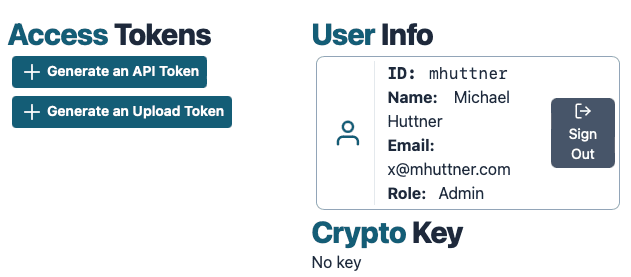
- Copy this token and enter it into the dabih cli.
Use
dabih config
to check if the cli was set up correctly.
Uploading
Upload files to dabih

Usage: dabih upload [OPTIONS] [PATHS]...

Arguments:
  [PATHS]...  The files that should be uploaded to dabih, this can also be a glob pattern

Options:
  -r, --recursive      If set, all files in a folder will be uploaded seperately
  -z, --zip            If set, folders will be gziped and then uploaded as single file
  -l, --limit <LIMIT>  Max number of files that should be uploaded, set to -1 for unlimited [default: 10]
  -h, --help           Print help
  -V, --version        Print version
Simply use e.g
dabih upload my_secret_file.txt
to upload a file to dabih.
Folders
There a two ways to upload folders:
-rrecursive, all files in a folder are uploaded seperately. Make sure to also set the-llimit if you intend to upload more than 10 files.-zzipped the folder is zipped and uploaded as a single file. The dabih cli will handle the zipping for you.
Mnemonics
Each uploaded file will give you a mnemonic, a unique name for the upload.
Mnemonics are always of the form <random adjective>_<random name>.
e.g. electrothermal_amenata
Download
Download a dataset from dabih

Usage: dabih download [OPTIONS] [MNEMONICS]...

Arguments:
  [MNEMONICS]...  The files that should be uploaded to dabih, this can also be a glob pattern

Options:
  -o, --output <OUTPUT>  If set, all files in a folder will be uploaded seperately
  -f, --force
  -h, --help             Print help
  -V, --version          Print version
To download datasets from dabih just call
dabih download <mnemonic>
- You can also specify multiple mnemonics in a single download command.
- Existing files will only be overridden with the
-foption. - Use
-oto set the output location, default is the current working directory.
Institute of functional genomics-Statistical Bioinformatics
©2023 · Version 1.12.14
Contact/Impressum · Privacy Policy · Data Policy · Documentation